Parquet to CSV Without Losing Precision, NULLs or Nested Data
Converting Parquet to CSV turns typed, possibly nested columns into plain text, so four things can go wrong: large numbers get rounded, NULLs and empty strings become indistinguishable, nested columns have nowhere to go, and timestamps lose their time-zone meaning. This guide shows what the DataToolbox Parquet to CSV converter writes in each case, using a small test file, and which export option controls it.
The example file and its CSV
The test file has one row per edge case: a 64-bit integer just above JavaScript's safe range, a DECIMAL(38,10), text with a comma, quotes and a line break, a double with NaN, a binary column, a list and a struct. With the default options (comma delimiter, NULL written as an empty field, nested columns as JSON text) the converter writes:
id,big,dec_wide,text,f64,bin,tags,addr
1,9007199254740993,1234567890123456789012345678.0123456789,"hello, ""world""",0.1,AAE=,"[""a"",""b""]","{""city"":""Pune"",""zip"":""411001""}"
2,-9223372036854775808,-0.0000000001,"",-1.5e+300,"",[],"{""city"":null,""zip"":""""}"
3,9223372036854775807,,,,,,
4,,1.0000000000,"multi
line",NaN,YWJj,"[null,""c""]","{""city"":""Kolkata"",""zip"":null}"
Every value above is the converter's actual output for that file; the rest of this guide explains each column.
Do large integers and decimals keep every digit?
Yes. A Parquet INT64 can hold values up to 9,223,372,036,854,775,807, but a JavaScript number is exact only up to 9,007,199,254,740,991. The converter reads 64-bit integers as BigInt, so 9007199254740993 is written as stored instead of being rounded to …992.
Parquet stores a DECIMAL(p,s) as an integer plus a scale: in INT32 for precision up to 9, INT64 up to 18, and in a byte array beyond that. The converter formats the stored integer with the column's scale, so DECIMAL(38,10) keeps all 38 digits and its trailing zeros (1.0000000000, not 1).
The CSV file is exact; the risk is the program that opens it. Spreadsheet apps and CSV readers that parse numbers as floating point can round these values on import. Import such columns as text, or declare them as DECIMAL/BIGINT in the loading tool.
Doubles are written in the shortest form that reads back to the same value, which can use exponent notation (-1.5e+300). NaN and infinity are written as the words NaN and Infinity.
How are NULL and empty string kept apart?
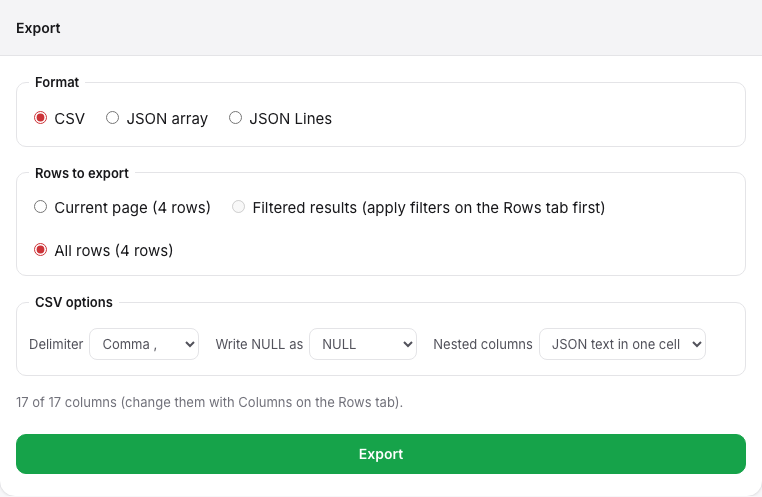
CSV has no NULL, so a converter has to pick a convention. This one makes the difference visible in the file:
- NULL is written as the token you choose in Write NULL as: an empty field (default),
NULL, or\N(the default NULL marker for MySQLLOAD DATAand PostgreSQLCOPYin text format). - Empty string is always written quoted,
"", so row 2's emptytextdiffers from row 3's NULL even with the default empty-field NULL.
With Write NULL as set to NULL and a semicolon delimiter, rows 2 and 3 become:
2;-9223372036854775808;-0.0000000001;"";-1.5e+300;""
3;9223372036854775807;NULL;NULL;NULL;NULL
Pick the token your loader understands. If a loader treats an empty field as NULL and you keep the default, empty strings still survive because they are quoted — provided the loader honours quotes.
What happens to nested lists, structs and maps?
CSV cells are flat, so nested columns need a rule. Nested columns offers two:
- JSON text in one cell (default): a list becomes
["a","b"], a struct{"city":"Pune","zip":"411001"}, quoted for CSV. Inside the JSON, NULL staysnulland empty strings stay"", and decimals and large integers are JSON strings so they keep their digits. - Leave out: nested columns are dropped and the header lists only flat columns (
id;big;dec_wide;text;f64;binin the example).
If downstream tools need nested data as real structure, export JSON instead with Parquet to JSON.
Timestamps, dates and binary columns
- Timestamps are ISO 8601 at the stored precision. A
Zis added only when the column is marked as adjusted to UTC; local and INT96 timestamps have no offset. The Parquet timestamps guide explains why. - Dates are
YYYY-MM-DD. - Binary values are Base64 (
AAE=is the two bytes00 01). An empty binary value is"".
The CSV format the converter writes
- Header row first, columns in the file's schema order (only the columns selected on the Rows tab).
- Fields are quoted when they contain the delimiter, a quote, a line break, or leading or trailing spaces; quotes inside are doubled (RFC 4180). Row 4's
textkeeps its line break inside quotes. - Lines end with CRLF.
Export trade-offs: which rows, and how much
- Rows to export is explicit: the current page, the filtered results (filters set on the Rows tab), or all rows, each with its row count shown before export.
- The CSV is built in browser memory before it is saved, and text is larger than the compressed Parquet it comes from. In our single-machine test, 5,000,000 rows (a 55 MB file) became a 338 MB CSV. Exports above 250 MB of decoded data are refused; filter rows or select fewer columns and export in parts. The full measurements and caveats are on the Parquet Viewer page.
- CSV drops the schema. Keep the Parquet file, or note the column types from the Parquet Schema Viewer, so the CSV can be loaded with the right types.
Checklist before you share the CSV
- Check the schema for
DECIMAL,INT64and timestamp columns. - Choose the NULL token your loader expects.
- Decide whether nested columns go in as JSON text or are left out.
- Export the rows you need, and import big-number columns as text or with explicit types.