Parquet Timestamps Explained: INT96, isAdjustedToUTC and Time Zones
A Parquet timestamp is either an instant in UTC or a local date and time with no time zone, and the file says which through the isAdjustedToUTC flag. Older files may instead use the legacy INT96 type, which carries no such flag. Reading the wrong kind as the other shifts every value by the time-zone offset. This guide explains the three encodings and shows exactly what the DataToolbox Parquet Viewer displays for each.
How does Parquet store a timestamp?
A modern Parquet timestamp is an INT64 column annotated with the TIMESTAMP logical type, which has two parameters (Apache Parquet logical types specification):
- unit:
MILLIS,MICROSorNANOS— the precision of the stored integer. - isAdjustedToUTC: with
true, the value is "the number of milliseconds, microseconds or nanoseconds elapsed since the Unix epoch, 1970-01-01 00:00:00 UTC" — an instant. Withfalse, it represents "year, month, day, hour, minute, second and subsecond fields in a local timezone, regardless of what specific time zone is considered local" — a wall-clock reading with no zone.
The legacy converted types TIMESTAMP_MILLIS and TIMESTAMP_MICROS map to isAdjustedToUTC = true with the matching unit, so they are UTC instants too.
What is an INT96 timestamp?
INT96 is a 12-byte physical type that older writers use for timestamps, holding a day number and the nanoseconds within that day. It is not a TIMESTAMP logical type and has no isAdjustedToUTC flag. Apache Spark describes it as "a non-standard but commonly used timestamp type", and it is still Spark's default: spark.sql.parquet.outputTimestampType defaults to INT96, with TIMESTAMP_MICROS and TIMESTAMP_MILLIS as the standard alternatives.
Because the file does not record whether an INT96 value is UTC, readers rely on convention, and writers disagree: Spark's documentation notes that "Impala stores INT96 data with a different timezone offset than Hive & Spark", and offers spark.sql.parquet.int96TimestampConversion to adjust Impala-written data. pyarrow writes INT96 only when asked, through an option named use_deprecated_int96_timestamps.
What the Parquet Viewer displays
The test file below has one timestamp column of each modern kind, plus a DATE. The Rows tab shows the type under each column name and a badge on each value:
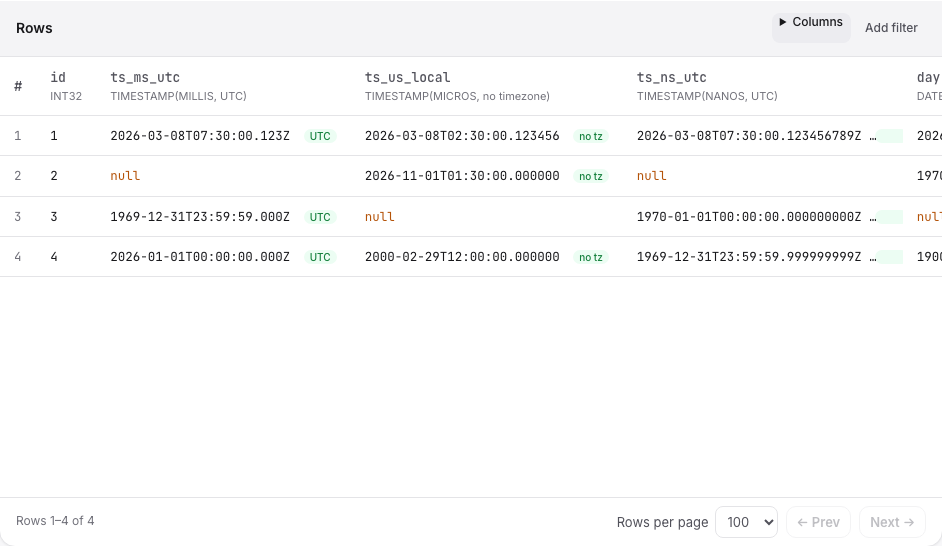
| Column type | Stored as | Displayed |
|---|---|---|
TIMESTAMP(MILLIS, UTC) | INT64 | 2026-03-08T07:30:00.123Z · UTC |
TIMESTAMP(MICROS, no timezone) | INT64 | 2026-03-08T02:30:00.123456 · no tz |
TIMESTAMP(NANOS, UTC) | INT64 | 2026-03-08T07:30:00.123456789Z · UTC |
INT96 timestamp (no timezone) | INT96 | 2026-03-08T07:30:00.123456000 · INT96 · no tz |
DATE | INT32 | 2026-03-08 |
The rules behind that output:
- Full precision. Values are formatted from the stored integer, so microseconds and nanoseconds are never rounded to milliseconds. Times before 1970 work too (
1969-12-31T23:59:59.999999999Zis the stored value −1 ns). Zonly for UTC-adjusted columns. A local timestamp is shown without an offset, because the file does not say which zone it was local to.- INT96 is shown without a zone and labelled INT96, since the file cannot say whether it is UTC. Its value is the day and nanoseconds as stored, with nine fractional digits.
- No conversion to your browser's time zone. The tool shows what is stored; it does not shift values to local time.
The same strings are used everywhere: in the Schema Viewer's stored min/max statistics, in CSV exports, and in JSON exports, where timestamps are ISO 8601 strings.
Common timestamp mistakes
- Treating a local timestamp as UTC.
2026-03-08T02:30:00.123456without aZis a wall-clock reading. AppendingZchanges its meaning by the original zone's offset. - Mixing INT96 files from different writers. Data written by Impala and by Spark can differ by an offset for the same moment; check which system wrote the file (the Schema Viewer shows the
created_byfield). - Losing precision on the way out. Tools that convert timestamps to JavaScript dates keep only milliseconds. Check exported values against the Viewer.
How to check a file's timestamps
- Open it in the Parquet Schema Viewer and read each timestamp column's type: unit, and
UTCorno timezone, orINT96. - Note the writer in Written by; for INT96 this tells you which convention applies.
- Open the Rows tab and compare a few values with the source system.
- When writing new files with Spark, consider setting
spark.sql.parquet.outputTimestampTypetoTIMESTAMP_MICROSso the type is standard and self-describing.
Sources
- Apache Parquet — Logical Types (TIMESTAMP, isAdjustedToUTC, legacy converted types)
- Apache Spark — Parquet files: configuration (outputTimestampType, int96AsTimestamp, int96TimestampConversion)